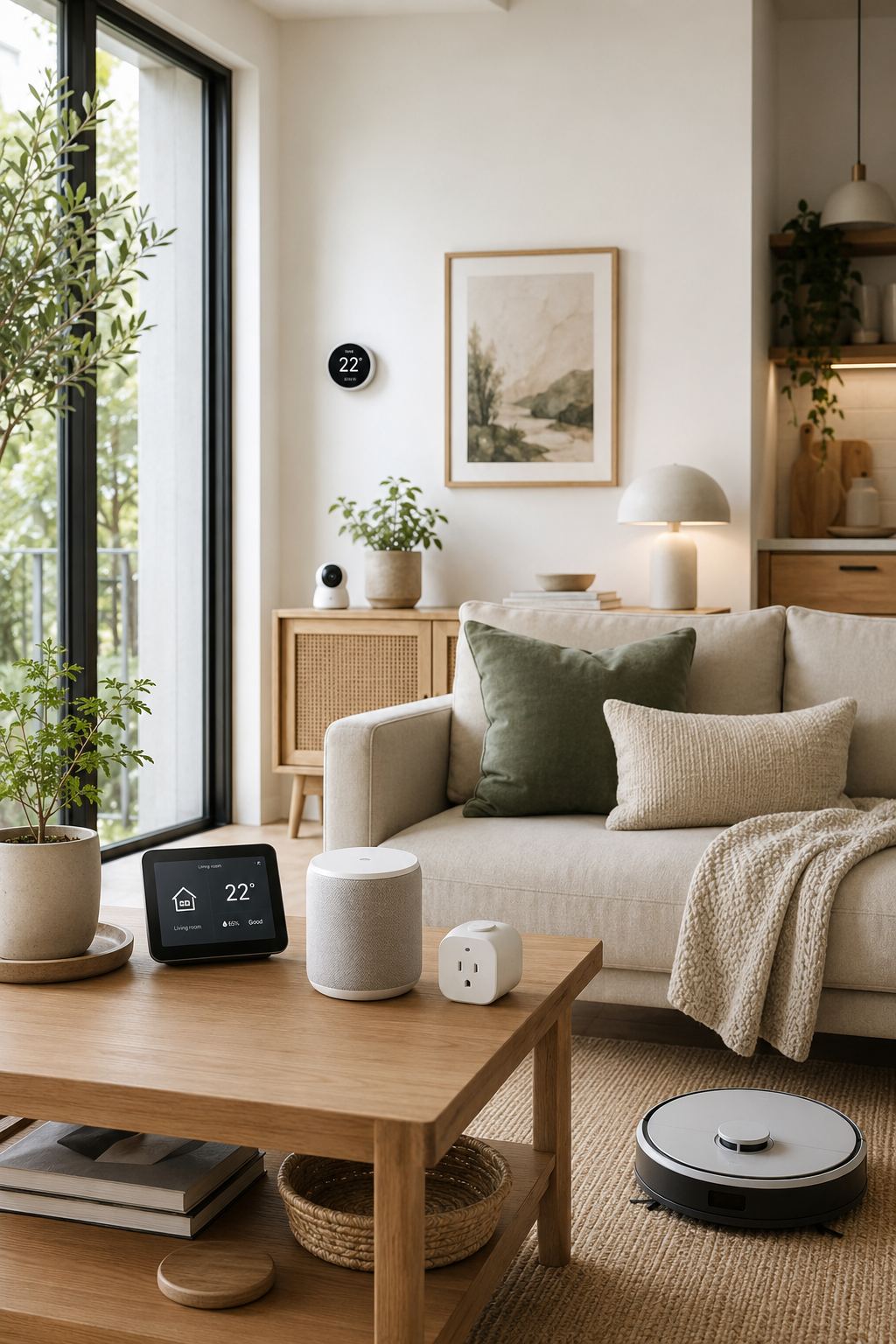
Smart home technology has changed considerably. What once felt like something reserved for expensive, futuristic houses can now be found in ordinary apartments and family homes.
But having a “smart” home doesn’t necessarily mean filling every room with connected gadgets.
In fact, buying too many devices can make a home more complicated rather than more convenient.
The best smart home upgrades are the ones that quietly solve everyday problems.
A light that turns on automatically when you need it. A plug that switches a compatible appliance off on a schedule. A sensor that alerts you to something you might otherwise miss. A robot vacuum that helps reduce one repetitive household task.
The goal should be simple:
Use technology where it genuinely makes your home easier to live in.
Here are 10 smart home upgrades worth considering.
01. Smart Lighting
Smart lighting is one of the easiest ways to introduce useful automation into a home.
Depending on the product and setup, smart bulbs or switches can allow you to:
- Schedule lights
- Control compatible lights remotely
- Adjust brightness
- Create lighting routines
- Control lights with voice commands
- Turn several lights on or off together
But you don’t need smart bulbs throughout the entire house.
Start with the lights you use most.
For example, a living-room lamp could automatically turn on in the evening, or bedroom lighting could be incorporated into a nighttime routine.
Think beyond convenience
Smart lighting can also help create different moods.
You might use brighter lighting while working and softer lighting in the evening.
The best setup depends on the bulbs, switches and smart-home ecosystem you choose.
02. Smart Plugs
Smart plugs can be useful when you want to add basic scheduling or remote control to a compatible appliance without replacing the appliance itself.
For example, depending on the device and manufacturer’s instructions, a smart plug could be useful for:
- Lamps
- Certain fans
- Some small appliances
- Decorative lighting
- Other compatible devices
You might schedule a lamp to switch on at a particular time or use a routine to control several compatible devices together.
Important: check compatibility
Not every appliance should be controlled through a smart plug.
Check the manufacturer’s instructions and the smart plug’s load rating before connecting anything.
Avoid using smart plugs as a substitute for proper safety controls.
03. Motion and Door Sensors
Sensors can be among the most useful smart-home devices because they allow your home to respond to what’s happening.
A motion sensor might trigger suitable lighting in a hallway.
A door sensor might alert you when a particular door opens.
A sensor could also become part of an automation routine, depending on the ecosystem.
For example:
**A simple automation**
Motion detected → hallway light turns on
This can be particularly convenient at night.
Start with a real problem
Don’t install sensors everywhere simply because you can.
Think about where you repeatedly experience an inconvenience.
If you regularly walk through a dark hallway at night, that’s a much better reason for adding a sensor than simply wanting another connected device.
04. Smart Leak Detection
Water damage can become a serious household problem.
A suitable water-leak sensor can provide an early warning when moisture is detected in a location where it shouldn’t be.
Depending on the product, sensors may be suitable for areas such as:
- Under sinks
- Near washing machines
- Near water heaters
- Around plumbing fixtures
The exact placement should follow the manufacturer’s recommendations.
A sensor doesn’t prevent a leak.
Its value is in potentially helping you notice a problem earlier.
For homeowners or renters who want an additional layer of awareness, this can be a more practical smart-home upgrade than another entertainment gadget.
05. A Smart Speaker or Home Assistant
A smart speaker can become useful when it is treated as a household tool rather than simply a music player.
Depending on the platform and compatible devices, you may be able to use one for:
- Timers
- Alarms
- Reminders
- Music
- Weather information
- Voice-controlled compatible devices
- Household routines
For example, you might use a voice assistant while cooking to set a timer without touching your phone.
Or you might create a bedtime routine that controls compatible lights and other devices.
Keep privacy in mind
Before setting up any connected device, review its privacy controls, microphone settings, account permissions and data policies.
Convenience shouldn’t come at the expense of understanding how a device works in your home.
06. A Robot Vacuum
For some households, a robot vacuum can be one of the most practical smart-home purchases.
Its value isn’t necessarily that it replaces every cleaning task.
Instead, it can help with routine floor maintenance.
Depending on the model and your home’s layout, it may:
- Clean on a schedule
- Navigate rooms automatically
- Return to its charging station
- Be controlled through an app
- Support mapping or room selection
This can be particularly helpful in homes with suitable hard floors or low-pile surfaces.
But don’t assume every home needs one
A robot vacuum may not be ideal if your home has lots of stairs, thick rugs, cluttered floors or layouts that make navigation difficult.
Consider your actual home before buying.
07. Smart Temperature Control
Heating and cooling can account for a significant portion of household energy use, depending on the home, climate and system.
Compatible smart thermostats or temperature controls can make it easier to manage schedules and monitor settings.
For example, you may want different temperature settings when you’re:
- Sleeping
- Away
- At home
- Preparing for the evening
However, compatibility is extremely important.
Not every heating or cooling system can work with every smart thermostat.
Don’t buy first and check later
Before purchasing, confirm compatibility with your existing system and understand whether professional installation is required.
08. Smart Energy Monitoring
One of the easiest ways to reduce unnecessary energy use is to understand where your energy is going.
Suitable energy-monitoring devices can provide information about consumption, depending on the product and electrical setup.
This can help you identify patterns.
For example:
- Which appliances use the most energy?
- When does consumption increase?
- Are certain devices running longer than expected?
The purpose isn’t simply to collect numbers.
The information becomes useful when it helps you make better decisions.
09. Smart Locks and Entry Technology
For suitable homes, smart locks can provide another layer of convenience around entry.
Depending on the system, features may include:
- Keyless entry
- Temporary access
- Activity notifications
- Remote control
- Integration with other compatible devices
But this category requires more careful consideration than a smart bulb.
Security matters.
Before purchasing, investigate the lock’s compatibility with your door, installation requirements, backup entry method, security features and what happens if power or connectivity is interrupted.
Convenience should never replace security
A smart lock is only a worthwhile upgrade if it provides appropriate security as well as convenience.
10. Smart Routines That Connect Everything
Individual smart devices can be useful.
But the real benefit can come from automation.
Instead of manually controlling every device, compatible systems can allow several actions to happen together.
For example, a simple evening routine might involve:
**An evening routine**
At a chosen time → living-room lights adjust → selected lights switch on → another compatible device changes state
A morning routine could potentially include compatible lighting, reminders and other devices.
The possibilities depend on your ecosystem.
Start small
Don’t create ten complicated routines on your first day.
Begin with one routine that solves an everyday problem.
If it works reliably, add another.
How to Build a Smart Home Without Overspending
Smart-home technology can become expensive quickly.
You don’t need everything at once.
Start with one problem
Ask:
“What household task annoys me repeatedly?”
Then look for technology that addresses it.
Choose one ecosystem where practical
Having devices that work together can simplify setup.
Before buying, check compatibility rather than assuming products will work together.
Don’t automate things that aren’t inconvenient
If manually switching a lamp takes two seconds and doesn’t bother you, automation may not add much value.
Consider ongoing costs
Some smart products require subscriptions for certain features.
Check this before purchasing.
Think about connectivity
Many smart devices depend on Wi-Fi, hubs or cloud services.
Understand what happens if your internet connection is unavailable.
Smart Home Mistakes to Avoid
Buying gadgets because they’re trendy
A product isn’t useful simply because it is “smart.”
Ignoring compatibility
Different ecosystems and devices may not work together.
Creating overly complicated routines
The more complicated an automation is, the more frustrating it can become when something fails.
Forgetting privacy
Review permissions and privacy settings for connected devices.
Ignoring security
Connected locks, cameras and other security-related devices deserve careful research.
Final Thoughts
A smart home doesn’t need to look like a technology showroom.
In fact, the most successful smart homes can feel almost ordinary.
The lights simply turn on when you need them.
The vacuum runs while you’re busy.
A sensor gives you a useful warning.
A compatible appliance follows a schedule.
The technology works quietly in the background.
That’s what makes it useful.
**Smart Space Finds takeaway**
Don’t build a smart home just because you can. Build one that solves problems you actually have.
Start with one useful upgrade, learn how it fits into your routine and expand only when another device genuinely adds value.
For more ideas in the same spirit, explore the smart home section, or keep going with our guide to 10 genius small-space storage ideas and the organization section.